Equalizer
A 10-band equalizer for your Mac music
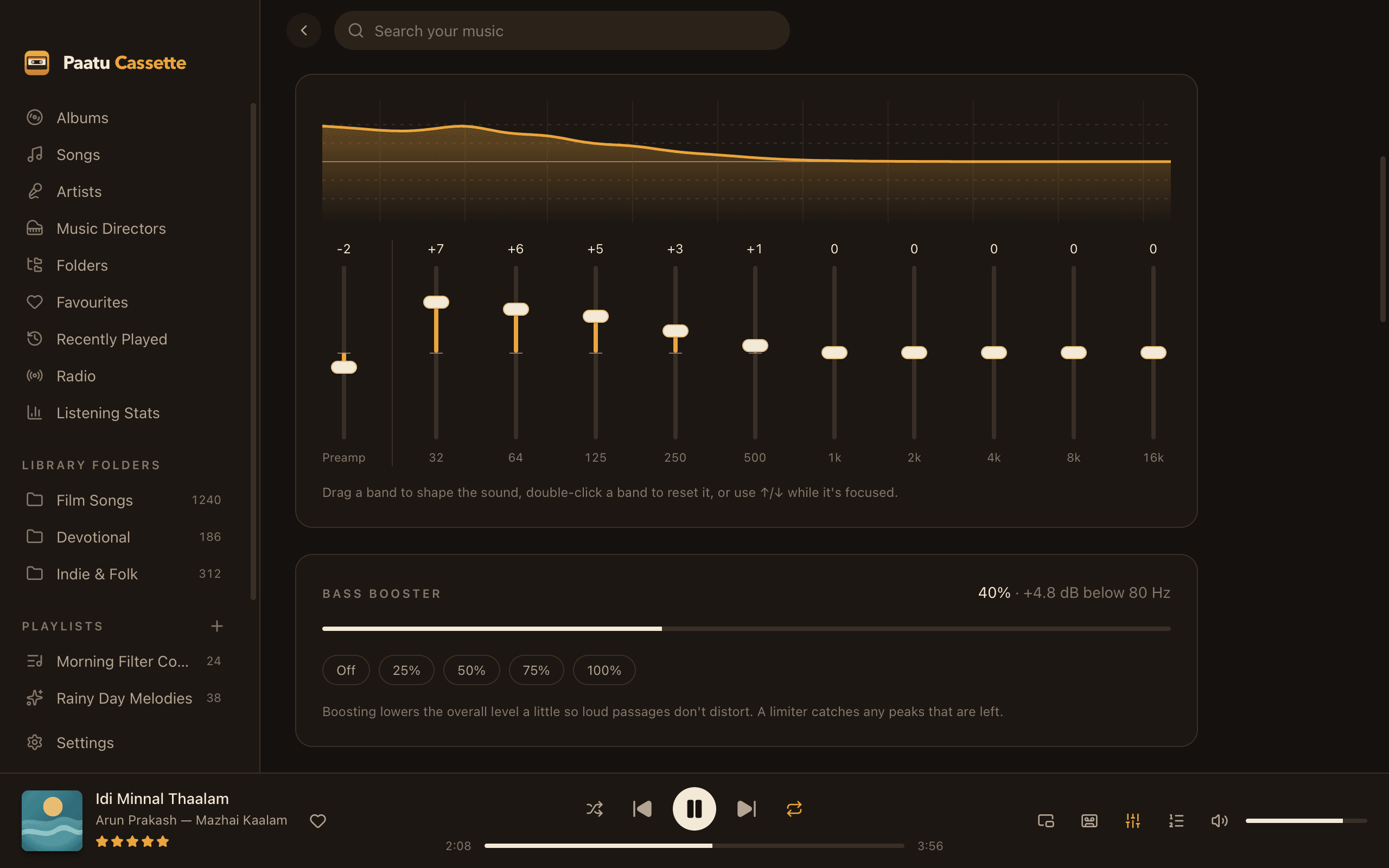
Ten bands, eleven presets, your own saved sounds and a bass booster, with a limiter that keeps every boost clean.
10 bands
32 Hz to 16 kHz, ±12 dB each, with a live response curve.
11 presets
Flat, Pop, Rock, Jazz, Classical, Bass Boosted, Vocal, Electronic, Acoustic, Treble Boost and Loudness.
Your presets
Save your own sound and switch to it in one click.
Bass booster
Up to +12 dB below 80 Hz, with quick Off/25/50/75/100% buttons.
Never clips
Boosts lower the level automatically, and a limiter catches peaks.
Press E
Switch the equalizer on or off from anywhere in the app.
Sound that suits the song, and the speakers
Laptop speakers, headphones, a car-style bass setup or a living-room system all need something different. Open the Sound page from the sliders icon in the player bar, pick a preset, or drag the bands until it sounds right, then save it as your own preset.
The equalizer applies to everything: your library, mixtapes and internet radio. Settings are remembered between launches.
Help
Learn how to use it
- Use the equalizer and bass boosterSwitch it on, pick a preset, save your own, and boost the bass.Read the guide →
- Add echo and reverb (Echo & Space)Tape echo, valley echo, or the sound of a hall or stadium.Read the guide →
- Keyboard shortcutsPlay, seek, search and switch the equalizer without the mouse.Read the guide →
FAQ
Equalizer & bass booster: questions
Does the equalizer work on internet radio?
Yes. Radio streams go through the same sound chain as your songs, so the equalizer, bass booster, Echo & Space and 5.1 surround all apply.
Will boosting the bass distort?
Paatu Cassette lowers the overall level a little when you boost, and a limiter catches any remaining peaks, so the sound stays clean.
Related
Goes well with
- EffectsEcho & Space effectsAdd a tape echo, a valley echo, or the space of a room, a hall or a stadium to any song.
- Home theatreStereo to 5.1 surroundConnect an HDMI receiver set to 5.1 and Paatu Cassette spreads stereo songs across all your speakers, automatically.
- PlaybackCrossfade, gapless & levellingCrossfade between songs, keep albums gapless, and bring loud and quiet recordings to the same level.
Press play on your own music.
Free download for Mac. Your songs stay on your Mac, exactly where they are.
Free · macOS 11 Big Sur+ · Apple Silicon (M1 or later) · Windows coming soon