Home theatre
Stereo songs in 5.1 surround
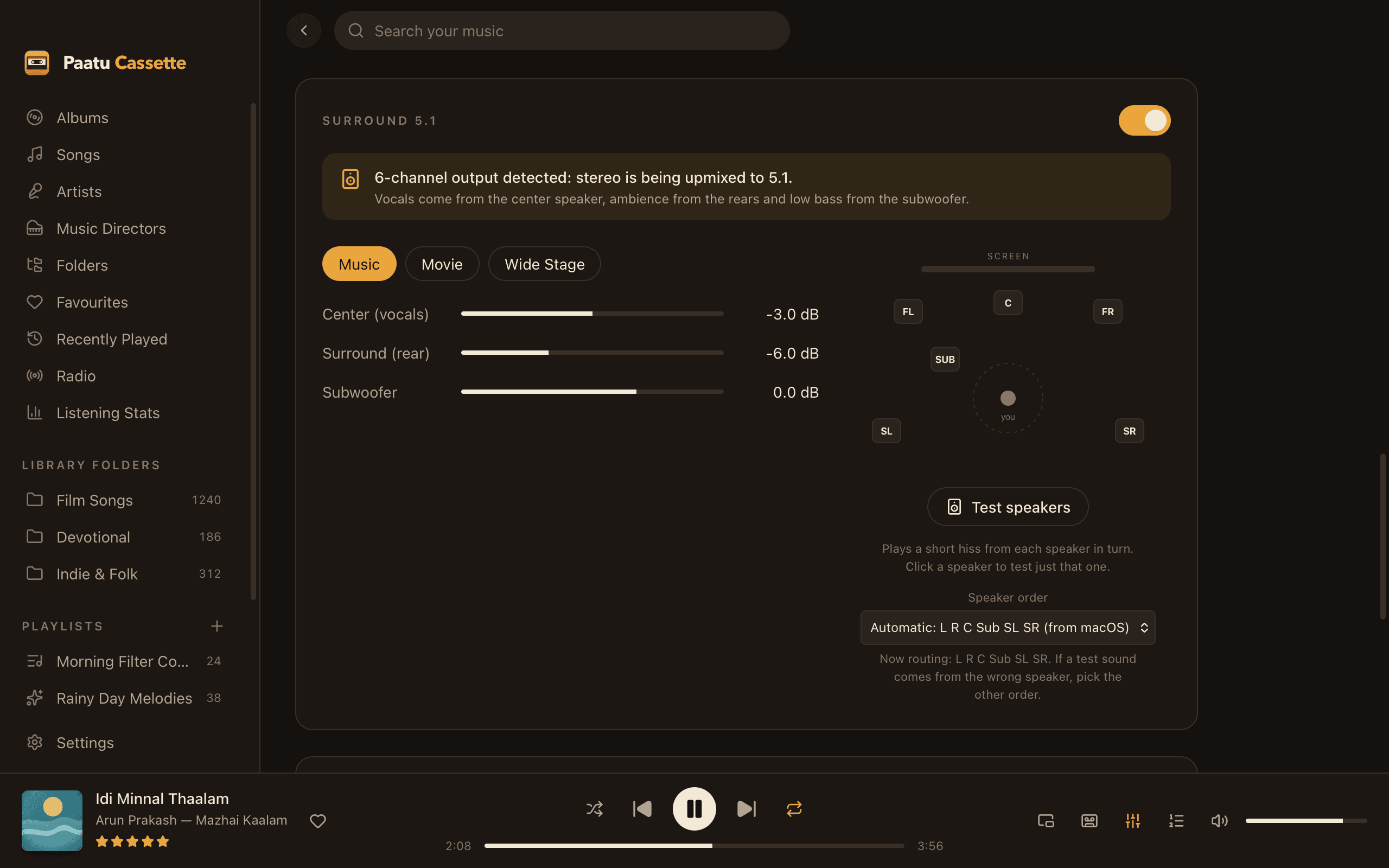
Connect an HDMI receiver set to 5.1 and Paatu Cassette spreads stereo songs across all your speakers, automatically.
Automatic
Switches on as soon as your Mac’s output has 6 channels.
Vocals in the centre
The voice moves to the centre speaker, clear from every seat.
Real subwoofer
Deep bass below 120 Hz goes to the sub.
Ambience in the rears
Reverb and width fill the rear speakers, delayed and softened.
Music, Movie, Wide Stage
Three presets, plus centre, surround and subwoofer levels.
Speaker test
Hear each speaker in turn, and fix the channel order if needed.
How the upmix works
The centre channel gets what’s common to left and right, which is mostly the vocals. The subwoofer gets the low end below 120 Hz. The rears get the difference between left and right, which is the ambience, slightly delayed and softened so the sound stays in front of you. The result is a full room of sound from ordinary stereo songs.
Works with your receiver
Prefer your receiver’s own Dolby Surround or DTS Neural:X? Switch the upmix off and the app sends clean stereo, or switch modes from the app with AV receiver control.
Help
Learn how to use it
- Enable 5.1 surround soundSet up your Mac and receiver so stereo songs play in 5.1.Read the guide →
- Test your speakers and fix the 5.1 speaker orderCheck every speaker and fix swapped centre or subwoofer channels.Read the guide →
- 5.1 surround isn’t detectedThe Surround card says “Current output is stereo”.Read the guide →
FAQ
Stereo to 5.1 surround: questions
Do I need special 5.1 music files?
No. Paatu Cassette upmixes ordinary stereo songs (MP3, FLAC, M4A and others) to 5.1 in real time.
How do I connect my Mac?
Use HDMI to your AV receiver, then set the HDMI device to 6 channels and 5.1 Surround in Audio MIDI Setup. The upmix switches on automatically.
Does it work with headphones?
The upmix only switches on with a 6-channel output. On headphones and Mac speakers you get normal stereo, with all the other sound features.
Related
Goes well with
- ReceiverAV receiver controlFind your Sony receiver on the network and switch its sound modes from the app, including one-tap Dolby Surround, DTS Neural:X or the app’s own 5.1.
- EqualizerEqualizer & bass boosterTen bands, eleven presets, your own saved sounds and a bass booster, with a limiter that keeps every boost clean.
- RadioInternet radioSearch thousands of stations by name, language or genre, save the ones you love, and hear them through your own sound settings.
Press play on your own music.
Free download for Mac. Your songs stay on your Mac, exactly where they are.
Free · macOS 11 Big Sur+ · Apple Silicon (M1 or later) · Windows coming soon